Oct 15, 2026 - By Team Relaio
A Broker’s Workflow for Property Portal Inquiries: Capture, Context and Assignment

"A property portal inquiry should enter a brokerage workflow with its original source, listing context, event type, arrival time and responsible owner intact. The team should then distinguish three things: an inquiry was assigned, someone attempted contact, and a real conversation took place. Those are separate outcomes and should not be reported as if they were the same.\n\nThis is a vendor-neutral operating workflow. Property portals differ in the events they expose, the fields they provide and the approved ways teams can receive them. Confirm current platform documentation and account permissions before designing an integration or making a platform-specific promise.\n\n> Key takeaway: Keep the inquiry event and the listing context together until an agent accepts the work and records what happened next.\n\n## Capture the event before assigning it\n\nRecord the information available from the authorized source:\n\n- portal or other source name;\n- listing or property reference, if supplied;\n- whether the event was a call, form, message or another inquiry type;\n- arrival timestamp and original message, when available;\n- contact details as received;\n- the agent or team currently responsible for the listing;\n- any stated next step.\n\nDo not assume all events contain the same information. A call event may not include the question a buyer would have written in a form. A brief message may name a listing but not explain the buyer’s broader search. Preserve the actual evidence and mark missing details as unknown.\n\n## Route by responsibility, then define a fallback\n\n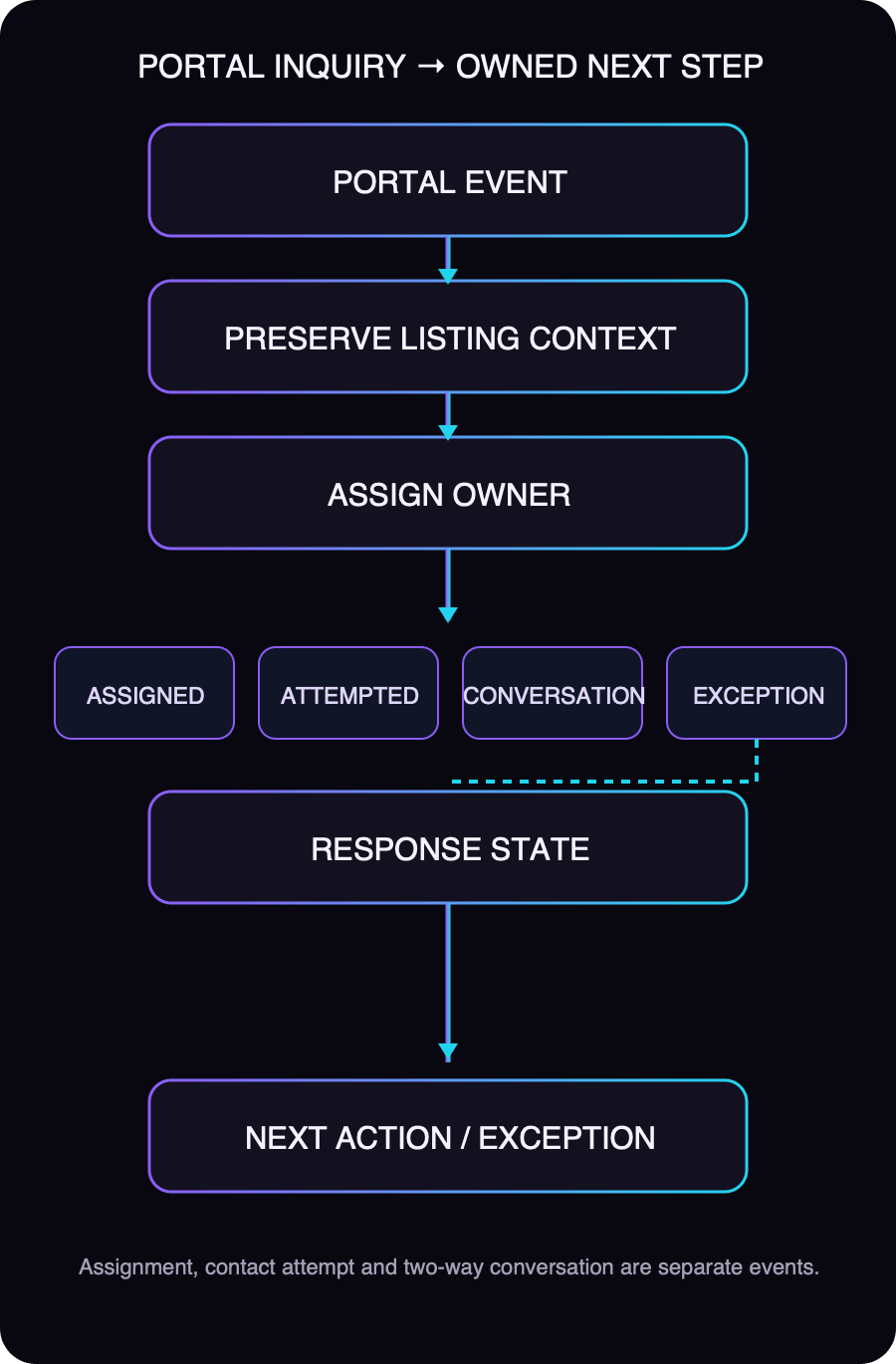 \n\n\n\nUse the brokerage’s real ownership rule. For example, the listing owner may handle an inquiry about that listing; a project or area team may own a broader project request. The exact rule belongs to the brokerage, not to a generic article.\n\nEvery route needs a fallback for cases such as:\n\n- the listing owner is unavailable;\n- the listing reference is missing or invalid;\n- multiple teams appear responsible;\n- the inquiry is for a property outside the assigned team’s scope;\n- the owner does not accept or act on the assignment.\n\nThe fallback owner should be a named person or a monitored operational queue. “Sent to the team” is not an accountable assignment. Keep reassignment history so the inquiry does not appear to have been owned by the final agent from the beginning.\n\n## Track assignment, attempt and conversation separately\n\nUse distinct states or events that match what actually occurred:\n\n| State | What it means | What it does not prove |\n|---|---|---|\n| Assigned | A responsible owner was selected. | The owner saw the item or contacted the buyer. |\n| Attempted | An agent tried an approved contact method. | The buyer received, answered or agreed to continue. |\n| Conversation started | Two-way contact occurred. | The buyer is qualified or ready to view. |\n| Waiting / next action set | A specific follow-up or internal check is pending. | The matter is resolved. |\n| Exception | The usual route cannot safely proceed. | The inquiry can be discarded. |\n\nThis distinction makes team reviews more useful. If assignments are complete but contact attempts are absent, the issue is acceptance or workload. If attempts exist but conversations do not, the team can inspect contactability and timing without labeling the inquiry “bad” by default.\n\n## Treat duplicates as a review signal\n\nThe same buyer may inquire about more than one listing. Those inquiries may belong to one person but represent different property interests. Avoid creating multiple unconnected contact records where reliable matching is possible, but do not merge separate listing inquiries into one undifferentiated request.\n\nWhen records appear to match, compare available contact identifiers, listing reference, message content and timing. Exact matches may be linked according to the brokerage’s CRM rules. Conflicting or incomplete matches should go to human review. Preserve both original events and their sources so the team can see why the buyer contacted the brokerage more than once.\n\n## Preserve context when a call or message moves to another owner\n\nIf the first agent cannot continue, the next owner should receive the listing reference, original event type, buyer’s message, contact attempt history, confirmed facts and pending question. Avoid a handoff note that says only “interested buyer.”\n\nIf the available source does not include enough context to answer, ask the buyer for the missing detail or check an approved listing source. Do not invent availability, pricing or property features. Record the next action and who owns it.\n\n## Use an exception path instead of silently dropping the inquiry\n\nSend an inquiry to review when the listing reference conflicts, routing rules point to two owners, contact details appear duplicated but uncertain, a source event is incomplete, or the assigned agent is unavailable with no confirmed backup.\n\nAn exception record should state:\n\n1. what failed or remains unknown;\n2. who will resolve it;\n3. what evidence is needed;\n4. whether the buyer needs an expectation-setting reply;\n5. when the issue will be reviewed again.\n\n## Portal inquiry checklist\n\n- [ ] Original source, event type and arrival time are retained where available.\n- [ ] Listing/property reference and message context stay attached to the inquiry.\n- [ ] Assignment follows a documented listing or team responsibility rule.\n- [ ] A fallback owner exists for unavailable or ambiguous assignments.\n- [ ] Assignment, contact attempt and two-way conversation are separate states.\n- [ ] Duplicate contact candidates preserve distinct inquiry records and sources.\n- [ ] Missing or conflicting information enters a visible exception path.\n- [ ] The record has a named next action and owner.\n\n## Verify portal-specific details before implementation\n\nOfficial documentation changes and access can depend on the account and integration. Property Finder documents an Enterprise API route for CRM connections and lead handling; that does not establish that every brokerage or every third-party system has the same access. Confirm documentation, permissions and supported events with the relevant platform. This guide does not claim that Relaio integrates with Property Finder, Bayut, Dubizzle or another portal.\n\nFor the broader real-estate follow-up workflow, see Relaio’s practical guide for property teams. For the current commercial workflow, visit the real-estate solution only after verifying the destination.\n\n"