Oct 18, 2026 - By Team Relaio
How to Triage Real Estate Launch Leads During a Campaign Spike

A project launch can bring more inquiries into the sales queue than the team can work at once. The first task is not to label every person “hot” or “cold.” It is to preserve the project and campaign context, decide what kind of work each inquiry needs, assign one accountable owner, and make exceptions visible before the queue grows stale.
This workflow is for the concentrated inquiry period around a property launch. It does not prescribe a marketing plan, a universal response-time target, or an automated system. Teams can run the same process in a CRM, a shared queue, or a controlled manual register, provided each inquiry has a visible state and owner.
Key takeaway: During a launch surge, every inquiry should have a project context, a triage state, one owner or named fallback, and a next action. An assignment alone does not prove that a buyer was contacted.
Start with a usable launch record
Before sorting inquiries, confirm that the intake record preserves enough context for a salesperson to respond accurately:
- project or campaign identifier, when known;
- original source and arrival time;
- the buyer’s original question or request;
- contact details as received;
- any buyer-stated budget, timing, unit type, or location preference;
- current owner, assignment time, and next action.
Keep buyer statements separate from internal assumptions. “Asked about a two-bedroom unit” is evidence. “Ready to reserve” is not, unless the buyer said so and the record preserves that statement.
If the inquiry lacks a project identifier or the campaign mapping is uncertain, route it to clarification or review. Do not attach it to the nearest active launch simply to clear the intake queue.
Use triage lanes that trigger different work
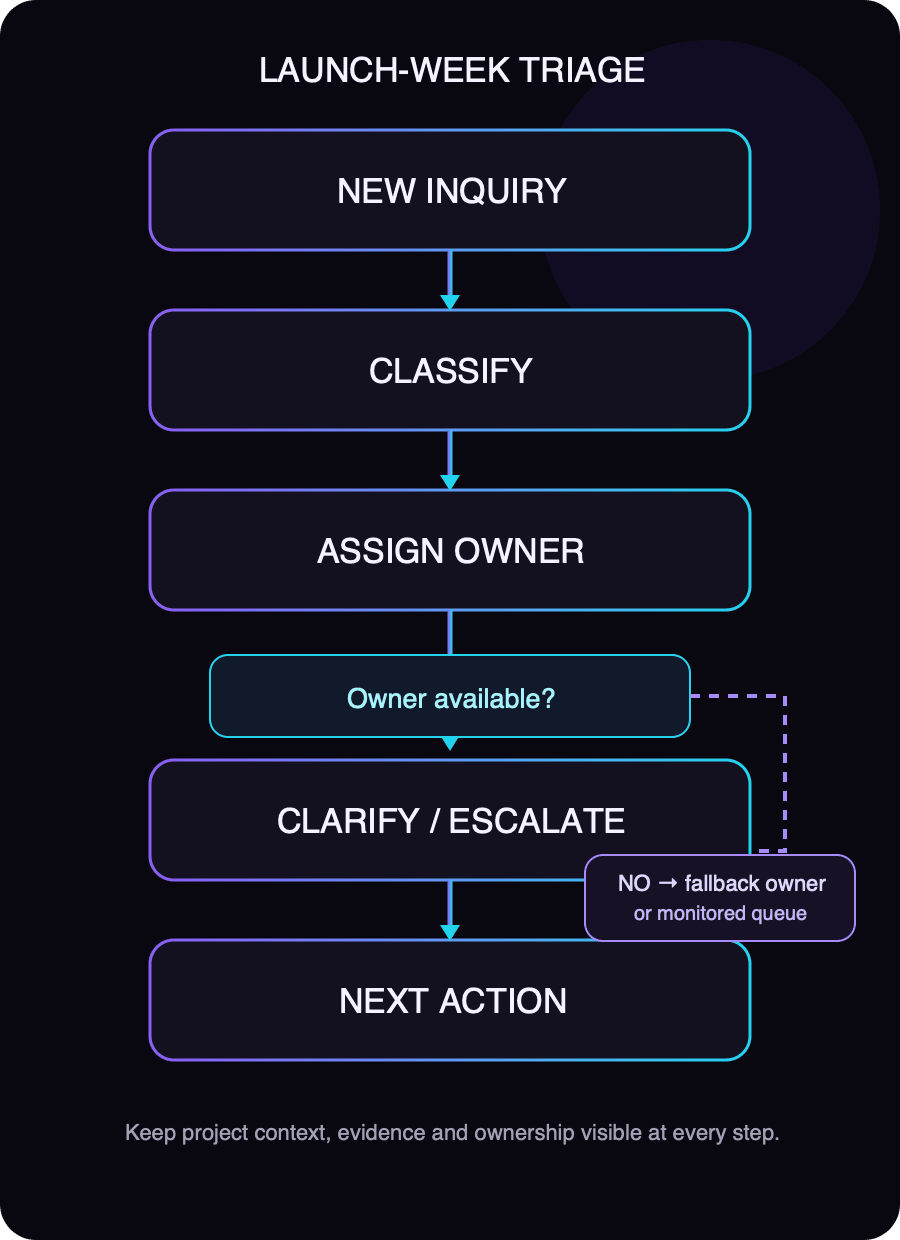
Four lanes are usually enough to begin. Adjust their names to match the team’s real process, but define what happens next in each.
| Lane | Use it when | Next action |
|---|---|---|
| Sales conversation needed | The buyer asks a specific project question or requests a direct sales discussion. | Assign a named sales owner and record the contact action to be attempted. |
| Clarification needed | Project, unit type, budget context, or request is missing or ambiguous. | Ask only for the missing information or have an operator review the record. |
| Later follow-up | The buyer indicates interest but gives a later decision window or asks to reconnect after an event. | Record the buyer’s stated timing and a dated follow-up owner/action. |
| Manual review / exception | The record is duplicated, contradictory, misrouted, or depends on unverified project facts. | Keep it visible in an exception queue until a person resolves it. |
These lanes describe work, not a prediction of who will buy. Avoid scoring people from incomplete data or using a launch list to pressure a buyer whose readiness is unknown.
Assign by project responsibility and available capacity
Start with the person or team responsible for the project. If a launch team owns all first inquiries, use that team’s published assignment rule. If the team is at capacity, define a fallback before launch: a named backup, a monitored queue owner, or an operations lead who can reassign work.
Do not use “the sales team” as the owner. A queue can be the intake destination, but a person must be responsible for watching it and resolving unassigned items.
When the assigned owner is unavailable:
- Keep the original owner and assignment history visible.
- Set the inquiry to an explicit waiting or reassignment state.
- Assign a fallback owner or flag it to the queue monitor.
- Record the reason and next review time.
- Do not claim that the inquiry was handled until a contact attempt or conversation is recorded.
Handle duplicates without erasing separate interests
One buyer may ask about multiple projects or submit more than one inquiry. A repeated contact detail is a reason to inspect the records, not automatically merge them.
Preserve each distinct project inquiry as an activity or linked request where the system allows it. If two records appear to represent the same request, compare contact details, project, original message and timestamps. When they conflict or the match is uncertain, send them for human review. Do not discard the newer inquiry or overwrite the buyer’s latest stated preference without a trace.
Unknown project details need an explicit stop
If a question depends on availability, price, payment terms, handover, a unit feature, or another project fact that the responder cannot verify, the next step is to check an approved source or escalate to the responsible project contact.
The reply should distinguish what is known from what is being checked. Record who owns the answer and how the buyer will receive it. Never fill a gap with a likely-sounding answer or treat an old brochure as proof of current availability.
Review the queue during the launch period
At the start and end of each staffed review period, inspect:
- inquiries with no project or source context;
- records without an owner;
- assignments with no recorded contact attempt;
- clarification requests waiting on a buyer or internal answer;
- duplicate candidates and conflicting project interests;
- inquiries whose next action is overdue;
- items that require a fallback owner.
For every exception, name the person who will resolve it and the next review point. A queue that simply accumulates “pending” records is not being managed.
Launch triage checklist
- Project, campaign, source and arrival context are retained.
- Buyer-stated facts are distinct from assumptions.
- Every inquiry has a triage lane and next action.
- Each active item has a named owner or monitored fallback.
- Duplicate candidates preserve distinct project interests.
- Unknown project facts stop for verification or escalation.
- Unassigned and stalled queues are reviewed by an accountable person.
- Contact attempt, actual conversation and assignment are recorded as different events.
Keep the workflow honest
Launch triage helps a team see what needs work and who owns it. It does not prove buyer readiness, guarantee a response time, or establish that a particular CRM or automation can route inquiries. Confirm the team’s tools, project facts and assignment rules before relying on them.
For general inbound qualification, read the AI SDR workflow guide and the real-estate follow-up workflow.
Explore the next step
Explore Relaio’s real-estate solution for a product overview.